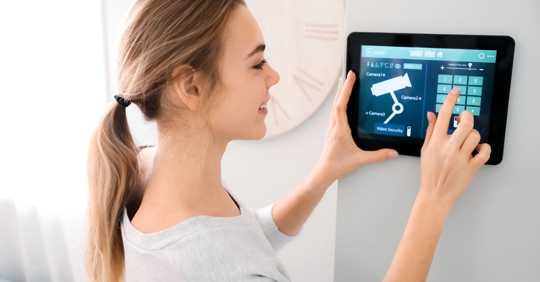
Protecting your home has never been more accessible thanks to DIY home security systems. These solutions empower homeowners to take control of their safety with straightforward installation, flexible features, and affordable pricing. Whether you’re new to smart home technology or looking to upgrade your current setup, understanding the essentials of these systems can help you make informed decisions for your household.
Modern self-installed security kits offer a range of options, from wireless cameras and motion sensors to smart alarms and mobile app integration. The convenience of setting up your own system means you can customize protection to fit your unique needs, all without the hassle or expense of professional installation. As technology advances, these systems have become more reliable and user-friendly, making them a practical choice for families, renters, and homeowners alike.
For those interested in exploring advanced features, consider checking out next-generation home security systems to see what innovations are shaping the future of home protection.
Why Choose a Self-Installed Security Solution?
The appeal of DIY home security systems lies in their flexibility and ease of use. Unlike traditional setups that require professional installation and long-term contracts, these modern alternatives allow you to:
- Save on installation costs by setting up devices yourself.
- Customize your system to match your property’s layout and your security priorities.
- Scale protection as your needs change—add or remove devices anytime.
- Control and monitor your home from anywhere using mobile apps and smart integrations.
These benefits make self-installed security systems especially attractive for renters, frequent movers, and anyone seeking a hands-on approach to home safety.
Key Components of a Modern DIY Security Setup
When building your own home protection network, it’s important to understand the core elements available. Most kits include:
- Base station or hub: The central unit that connects all devices and communicates with your smartphone.
- Door and window sensors: Detect unauthorized entry points.
- Motion detectors: Monitor movement in key areas.
- Security cameras: Offer live video feeds and recording, often with night vision and two-way audio.
- Alarms and sirens: Sound alerts to deter intruders and notify occupants.
- Smart locks and garage controls: Allow remote access management.
Many systems also support integration with voice assistants like Alexa or Google Assistant, enabling hands-free control and automation.

Step-by-Step Guide to Setting Up Your Own Security System
Getting started with a self-installed home security kit is simpler than you might expect. Here’s a practical walkthrough:
- Assess your property: Identify vulnerable entry points, such as doors, windows, and garages. Consider outdoor areas that may need surveillance.
- Choose the right kit: Select a package that matches your home’s size and your desired level of protection. Look for expandable systems if you plan to add devices later.
- Install the hub: Place the base station in a central location for optimal wireless coverage.
- Mount sensors and cameras: Follow manufacturer instructions for placement. Most devices use adhesive strips or simple screws, making installation quick and damage-free.
- Connect to your network: Use the system’s app to link devices to your Wi-Fi and test connectivity.
- Configure alerts and automation: Set up notifications, schedules, and integrations with other smart home devices.
- Test your system: Trigger sensors and alarms to ensure everything is working as expected.
Most reputable brands provide detailed guides and customer support, making the process approachable even for beginners.
Comparing DIY and Professional Security Options
While DIY home security systems offer convenience and customization, it’s helpful to weigh them against traditional, professionally installed solutions:
| Feature | DIY Systems | Professional Systems |
|---|---|---|
| Installation | Self-installed, no appointment needed | Installed by technicians |
| Cost | Lower upfront and ongoing costs | Higher setup and monthly fees |
| Customization | Highly flexible, add/remove devices anytime | Limited by provider’s packages |
| Monitoring | Self-monitoring or optional professional plans | Usually includes 24/7 professional monitoring |
| Portability | Easy to move or expand | Challenging to relocate |
For many, the ability to control and adapt their own security setup outweighs the benefits of professional installation, especially as technology continues to improve.
Enhancing Your Home’s Safety with Smart Features
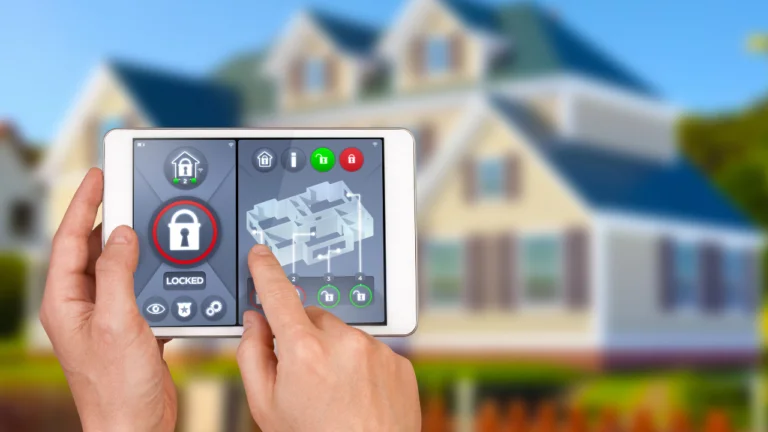
Today’s self-installed security solutions go beyond basic alarms. Many systems offer advanced features such as:
- Mobile app control: Arm, disarm, and monitor your system remotely.
- Real-time notifications: Receive instant alerts for suspicious activity.
- Cloud video storage: Access recorded footage anytime, from anywhere.
- Environmental monitoring: Detect smoke, carbon monoxide, water leaks, and more.
- Energy management: Integrate with smart thermostats and energy monitors for greater efficiency.
For a deeper dive into how technology is shaping tomorrow’s home protection, explore the future of home protection technology and see what trends are emerging.
Tips for Maximizing Reliability and Peace of Mind
To get the most from your DIY home security setup, keep these best practices in mind:
- Regularly test devices to ensure sensors and alarms are functioning properly.
- Update firmware and apps to benefit from the latest security patches and features.
- Secure your Wi-Fi network with strong passwords and encryption to prevent unauthorized access.
- Position cameras strategically to cover entry points and high-traffic areas.
- Review and adjust notification settings to avoid alert fatigue.
For broader risk management strategies, consider reading this personal risk management guide for proactive home protection.
Frequently Asked Questions
Are DIY security systems as effective as professional ones?
Many self-installed security kits provide robust protection, especially when properly configured and maintained. While professional systems may offer 24/7 monitoring, modern DIY solutions often include optional monitoring plans and advanced features that rival traditional providers.
Can I install a home security system if I rent my home?
Absolutely. Most self-installed security devices use adhesive mounts or non-invasive hardware, making them ideal for renters. They can be removed and reinstalled easily when you move.
What happens if my internet goes down?
Some systems offer cellular backup or local alarms that function even if your Wi-Fi is offline. It’s important to check the specifications of your chosen kit to ensure you have continuous protection.
Conclusion
Self-installed security solutions have transformed the way people protect their homes. With easy setup, customizable features, and reliable performance, these systems offer a practical path to peace of mind. As you explore your options, remember to assess your property’s needs, compare available kits, and take advantage of smart features for comprehensive protection. For those interested in additional ways to safeguard their living space, topics like home hygiene protection systems and rodent detection for homes can further enhance your home’s safety and comfort.